



At WordCamp US 2025, Matt Mullenweg, in his keynote, announced Telex, Automattic’s new AI-powered project that lets users generate custom Gutenberg blocks from text prompts.
Telex is still in its experimental phase and, for now, is only available on desktop. It already allows exporting generated blocks as ZIP files that can be installed on WordPress sites or in Playground as plugins.
Exploring Telex
Describing the project during his keynote, Mullenweg called Telex “V0 or Lovable, but specific for WordPress and building blocks.”
To access Telex and its AI-powered block building feature, users need to sign in and then provide their desired custom Gutenberg block prompt.
Once the prompt is provided, Telex will start generating the custom WordPress block and will provide a preview of the progress as well as the number of lines of code generated.

Once a block is generated, it can be previewed and further refined using the assistant tab on the right-hand side.
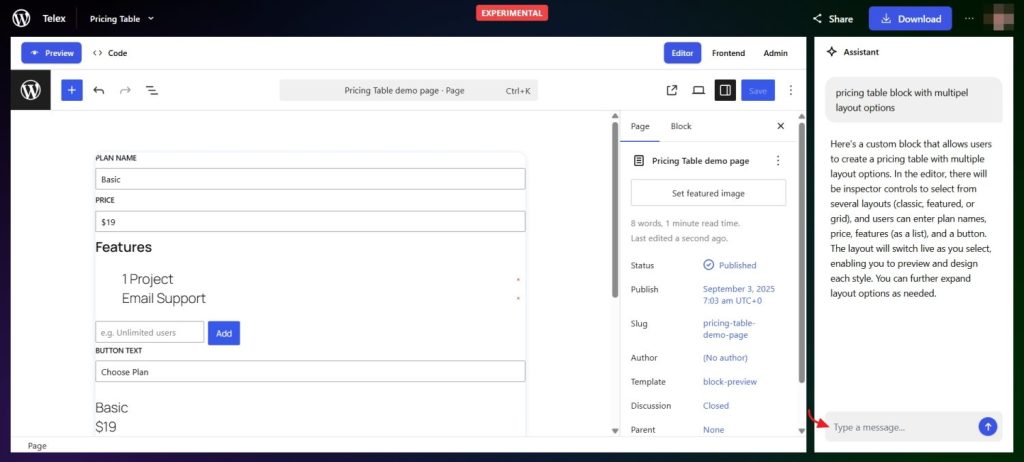
A code preview tab is also available, letting users review and adjust the underlying code as needed.
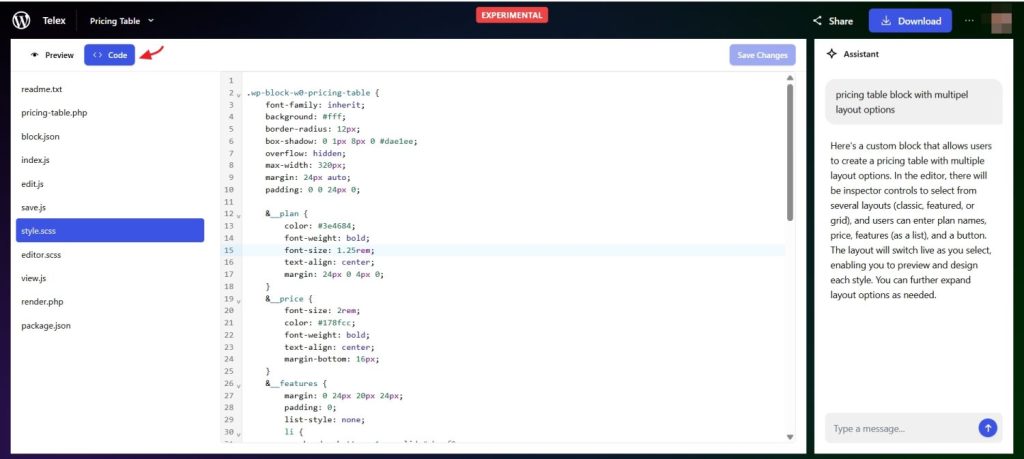
The generated Gutenberg block can also be downloaded as a ZIP file and installed as a plugin on any WordPress site or in Playground. Earlier this year, WordPress announced the formation of an AI Team, along with a series of AI projects the team plans to develop.
The Community Response
Oliver Slid stated that Telex could be a game-changer, “ Telex could be a game changer if it becomes widely available as an AI builder for WordPress.”
Chris Hubber tweeted that the Telex tool is “awesome”.
Stefan Velev called it “wild” and was impressed by it.
Matt Cromwell created a TL;DR button with Telex.
Richard Gorbutt also took Telex for a spin and created a block to calculate EV charging costs.