


TeamUpdraft (the company behind UpdraftPlus) has confirmed unauthorised access to teamupdraft.com over the weekend of 17–18 October 2026, potentially exposing customer data and connection keys.
An attacker used compromised UpdraftCentral keys to send commands to connected WordPress sites and install malicious backdoor plugins. TeamUpdraft has since released an update to revoke existing UpdraftCentral connections and advised users to check their sites for signs of compromise.
How the UpdraftCentral attack worked
UpdraftCentral is TeamUpdraft’s remote site management service, and its client is included in every copy of UpdraftPlus, both free and Premium. It allows users to manage connected WordPress sites through a central dashboard. When a site connects to UpdraftCentral Cloud, cryptographic keys authenticate commands sent from the dashboard. The attacker exploited compromised connection keys to send commands that connected sites accepted as legitimate, rather than exploiting a vulnerability in UpdraftPlus itself.
Nethemba documented the attack on three of its WordPress sites on 19 October 2026. The attacker sent a plugin.upload_plugin command through UpdraftCentral. The command successfully installed and activated an unknown plugin on two sites, while the third upload failed because the user associated with that site’s connection key did not have permission to install plugins.
The malicious plugins were designed to establish backdoor access to affected sites. Nethemba found that one sample was intended to create an account with disguised administrator privileges and log the attacker directly into the site. However, a coding error prevented that sample from working as intended, causing errors on requests that were not served from cache.
Rather than assigning the account the Administrator role, the plugin assigned it the Editor role, then separately granted it the manage_options and install_plugins capabilities. This allowed the account to manage site settings and install plugins despite appearing to have a lower role in the WordPress dashboard. Patchstack warned that, “The account shows as an Editor, so reviewing your administrator list misses it entirely.”
Nethemba described the danger posed by the compromised connection keys, “Whoever holds them can install and run arbitrary code on every connected site without the owner knowing.” The attack relied on the privileges available through the compromised connections, not a flaw in the UpdraftPlus plugin code.
Patchstack identified 99 distinct names used for backdoor plugins, which they also listed in their report. The different names matter when checking a site for suspicious plugins, since the backdoors did not all appear under one name.
The first update released by TeamUpdraft did not remove the compromised keys as intended. On 19 October, the company released UpdraftPlus 1.26.12 and 2.26.12 to remove affected UpdraftCentral Cloud keys. Nethemba examined the update and found that a bug prevented the removal process from working, writing, “it deletes no key at all”.
TeamUpdraft released UpdraftPlus 1.26.13 and 2.26.13 later that evening to fix the bug. However, Nethemba reported that keys created between 12:07 and 21:00 UTC on 18 October could remain even after the corrected update was installed. The fixed versions removed keys created before 12:07 UTC that day, but some remaining keys required manual deletion.
Patchstack provided instructions for checking and removing the keys. Administrators can check the stored keys by running wp option get updraft_central_localkeys. To remove them, site admins can do it directly from the wp-admin by gointo Settings → UpdraftPlus Backups → Advanced Tools → UpdraftCentral → Manage existing keys (N). Alternatively, administrators can run wp option delete updraft_central_localkeys. Removing a site from the UpdraftCentral dashboard alone does not necessarily remove the key stored on the WordPress site, so administrators should verify that the keys have been deleted.
Nethemba later reported that the attacker attempted to send commands to two of its sites again on the morning of 21 October. Its must-use plugin blocked those commands, and the keys on those sites no longer existed.
TeamUpdraft said the UpdraftPlus plugin code and its downloads were not affected by the incident. It also stated that self-hosted UpdraftCentral was not affected.
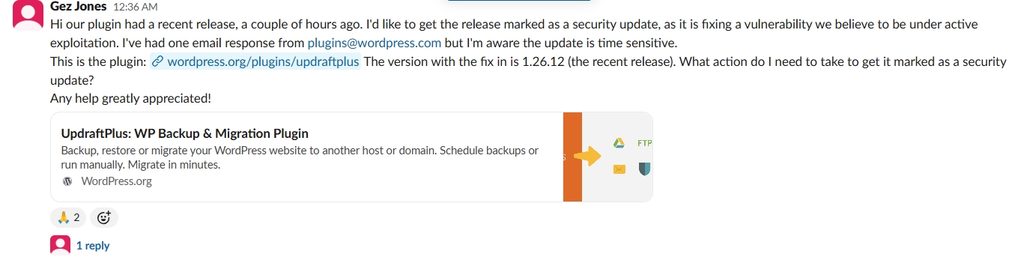
After releasing UpdraftPlus 1.26.12 on WordPress.org, the team sought to expedite its recognition as a security update, citing active exploitation of the vulnerability it fixed.
In the #pluginreview Slack channel, Gez Jones (Partnerships Manager at UpdraftPlus) asked what steps were needed to have the release marked as a security update, noting that “the update is time sensitive.” The request came as the team sought to speed up the release process amid delays associated with the Protect the Shore initiative.
A growing wave of supply chain attacks in 2026
The UpdraftCentral incident and the recent Rank Math attack add to a growing number of supply chain attacks targeting WordPress plugins in 2026. Earlier incidents included the temporary closure of more than 80 WPFactory plugins on WordPress.org following a suspected backdoor in a premium plugin, a June attack that compromised five products associated with Awesome Motive, a July incident in which tampered versions of Fluent Forms Pro and Ninja Tables Pro were distributed to customers, and a compromise at ShapedPlugin that delivered backdoored versions of premium plugins through its update system.
Community Response
Patchstack CEO Oliver Sild warned that the attacks were continuing, stating, “These attacks are still on-going and for now there are no signs of it slowing down.” He added, “Some even say it’s worse than WP2Shell when it comes to how many websites are being compromised.”
Sybre Waaijer criticised the use of remote scripts and remote management features, calling for them to be removed, “Stop loading remote scripts. Stop adding remote management without paths and expiry. Remove the autoupdate index. They’re all backdoors”.