

WordPress 7.1 “Mary Lou,” the second major release of the year, has been released, named after pioneering jazz pianist, arranger, and composer Mary Lou Williams. The release includes contributions from more than 800 people worldwide, including over 170 first-time contributors.
It delivers more than 1,500 enhancements and fixes, including responsive styling, a new media editing workflow, expanded Notes, new blocks, and more.
New Features and Changes in WordPress 7.1
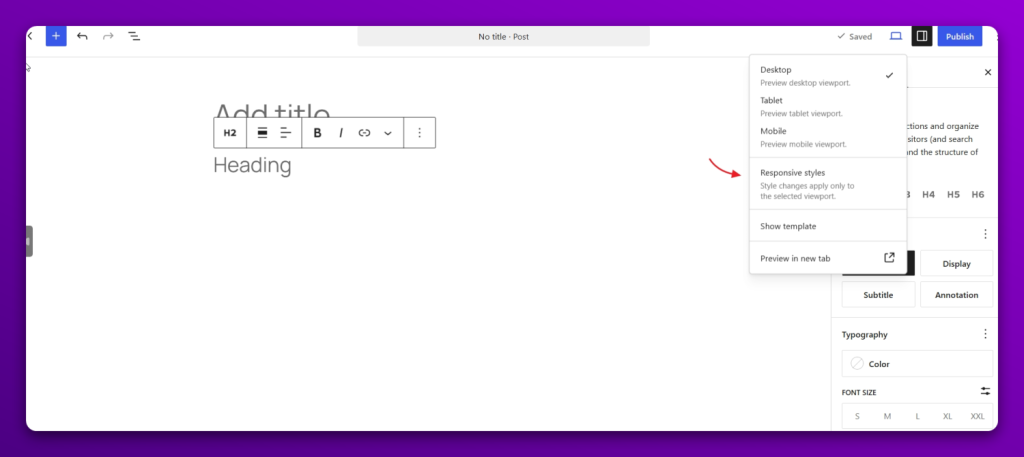
Responsive Styles
WordPress 7.1 adds responsive styling options for blocks, allowing styles to be defined separately for different viewport sizes through Global Styles or individual block settings without the need for custom CSS. The release also allows themes to configure the mobile and tablet breakpoints, which are used for responsive block styles and block visibility.
Interactive states styling
Users can now style pseudo-states such as hover, focus, focus-visible, and active for Button and Navigation Link blocks through Global Styles and individual block settings. All this previously required writing custom CSS, but not anymore. Support for more blocks is expected in the future.

New Media Editor modal
The new editor replaces the familiar inline cropper, and the new workflow still uses the existing crop button to be accessed, but opens up in an entirely new window. It introduces a dedicated image editing workflow with freeform cropping, aspect ratio controls, rotation, flipping, and metadata editing.

Two new blocks
The release also brings two new blocks: Playlist and Tabs. The Playlist block lets users create playlists with waveform visualizations and edit metadata such as the artist name, album, and track image.

The Tabs block, on the other hand, provides a way to group related sections of content under separate tabs. Useful for FAQs, product features, event information, and so on.

Notes improvements
The Notes feature has received a few new improvements, mainly: inline notes, mentions, and rich text. The inline notes improvement allows us to leave a comment on a specific portion of the text that we’ve highlighted. Earlier, it was only possible to leave a comment on the block as a whole and not at specific places.

The new mentions feature allows us to directly tag another user on the site to ensure they are notified and don’t miss the Note when we want to bring something to their attention or collaborate on content. Along with this, there is also support for rich text such as bold, italics, code, and links.

Accessibility Improvements
The release includes 44 accessibility enhancements and bug fixes in WordPress Core and 43 in the editor. The updates cover focus management, keyboard navigation, accessible labeling and names, tooltips, High Contrast Mode, form controls, media, blocks, admin interfaces, and other areas across WordPress Core and the editor.
It also fixed an 11-year-old accessibility issue in admin post list tables by making the post title the row header instead of the checkbox column. This allows screen readers to identify each row by the post title, while the checkbox column becomes a regular table cell.
Also, the Image block now includes a “Mark as decorative” option, allowing users to indicate that an image is decorative and does not convey meaningful information to assistive technologies.
Post Editor Now Fully Iframed
The post editor is now always iframed in WordPress 7.1, bringing it in line with the Site Editor, Template Editor, and device previews. Previously, whether the post editor used an iframe depended on the blocks and environment. Most blocks already work with the change, though developers may need to update custom blocks and plugins that interact directly with the editor canvas.
Infinite scrolling in the Media Library
Infinite scrolling is now enabled by default in the Media Library’s Grid view and Media Modal, allowing attachments to load automatically as users scroll. Users who prefer the Load more button can disable infinite scrolling through a new option in their profile settings.
Consistent navigation with a persistent toolbar
The admin toolbar now remains visible across the Post and Site Editors by default, providing consistent navigation throughout WordPress. The previous “W” logo or site icon back button has been replaced with a dedicated back button, while the site icon now appears in the toolbar when set.

SVG Icon API
The SVG Icon API is now a public API, allowing developers to register their own icon collections and icons and use them across the editor, PHP, and REST API.
Client-Side Media Processing
WordPress 7.1 also introduces client-side media processing, moving image compression, resizing, format conversion, rotation, and thumbnail generation to the browser using WebAssembly. It also adds support for HEIC and AVIF uploads, converts opaque animated GIFs to more efficient video, and makes uploads more resilient by retrying failed requests and resuming after connectivity is restored. Browsers that do not support the feature automatically fall back to server-side processing.
Text shadow support now in Global Styles
With this release, themes can now define text-shadow values through theme.json, applying them globally, to specific blocks, or to elements such as links. The initial implementation is limited to theme.json styling, with block controls, Global Styles UI, presets, and block support planned for a future release.
Besides, there are several more updates, like improvements to the Abilities API, new Design System Theming, introduces wp_get_tooltip() and wp_get_toggletip() for adding accessible names to icon-only controls and providing additional help information.
The WordPress 7.1 Field Guide is now available, along with the Source of Truth for the release.
WP Rocket issue raises questions over pre-release testing
Following the WordPress 7.1 release, WP Rocket users began reporting that their sites were going offline.
Austin Ginder was among the first to publicly report the issue, saying he had manually patched the plugin to restore affected customer sites.
The underlying bug had already been reported in WP Rocket’s GitHub repository on July 6, during the development phase of WordPress 7.1, giving the team more than enough time to address it before the final release.
Activity on the GitHub issue gained momentum after the release, with the GitHub issue being marked as critical and users confirming that it was reproducible on WordPress 7.1 stable. Mathieu Lamiot (VP of Engineering at group.one) acknowledged the problem and released hotfix 3.23.2.2.
Ginder also pointed to the time WP Rocket had to identify the issue, saying, ” According to Grok, WP Rocket had 54 days to discover the bug.”
The 7.1 release was coordinated by a cross-functional team of contributors, with Anne McCarthy serving as release lead. Benjamin Zekavica and Krupa Nanda handled release coordination, while Aki Hamano and Joe Dolson served as tech leads. Adrian Duffell, Sajjad Hossain Sagor, and Sergey Biryukov led triage, with Huzaifa Al Mesbah and Nikunj Hatkar leading testing.
The call for volunteers for WordPress 7.2 is also now open.